
When you first attempt to install CCA (by double-clicking the CCA.MSI file in your Downloads folder), depending on your version of Windows and your security settings, Windows may present a Windows protected your PC message, similar to the one shown below, that initially blocks you from proceeding.
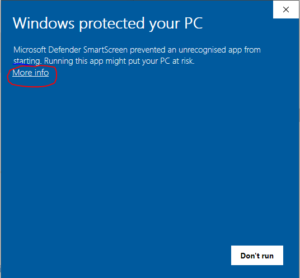
If you have checked that the CCA.MSI installer file is genuine – read: How we keep CCA downloads secure. Then you can ignore this message by clicking More Info (circled in red)
This will subtly alter the Windows message (see below). Click Run anyway and the install process will begin.
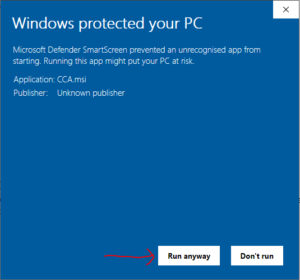
This only occurs on the very first install because CCA.MSI is new to your PC and Windows is being cautious (that’s a good thing) in protecting you. When you come to install a newer version of CCA (like an upgrade), your PC should run the CCA.MSI installer file without issue.