Is this download safe?
We take security seriously and want you to be confident that you’re installing the genuine Club Cricket Analytics software.
This simple safety guide will help you check that the Club Cricket Analytics download (CCA.MSI) file is genuine and safe to use.
After clicking on the CCA.MSI Download button, proceed as follows:
1. Check Digital Signature (optional)
Every CCA.MSI download file is digitally signed by us:
- Name: Club Cricket Analytics
- Email: Support@Club-Cricket-Analytics.uk
You can verify this:
- Right‑click the downloaded file (now in your download folder) and choose Properties
- Open the Digital Signatures tab (if this tab is not shown, it’s NOT signed!)
- Select the signature and click Details
- Confirm the signer information is Club Cricket Analytics and the email matches Support@Club-Cricket-Analytics.uk
If those details don’t match, or if you still have any concerns about the safety of the download, please contact us.
2. Install Process
- Double-click the CCA.MSI file located in your downloads folder
- This will open with “Welcome to CCA Setup Wizard” – click Next >
- Please read the Intro and USER LICENCE section – then click Install
- When you see the Publisher: Unknown warning message – click Yes (see Why do I see … below)
- Click Finish
3. Why do I see unknown publisher?
When you install CCA.MSI Windows will show an amber “User Account Control” box asking: Do you want to allow this app from an unknown publisher to make changes to your device?
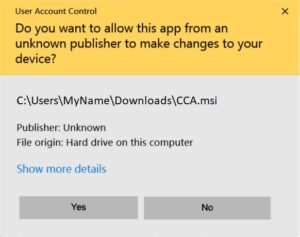
This message appears because we currently use a self‑signed digital certificate, not an expensive certificate from a commercial provider that Windows already trusts. Windows therefore cannot automatically recognise us as a known publisher.
This warning does not automatically mean the file is harmful. It simply means:
- Windows does not have our certificate in its list of built‑in trusted publishers, and
- It wants you to manually confirm that you trust the source.
As long as you have:
- Downloaded the CCA.MSI installer file from the official Club Cricket Analytics website, and
- Checked the digital signature details (see top of this page) match the information on this page,
you can be confident you are installing the genuine Club Cricket Analytics software.
4. Trust future CCA Installs
If you regularly upgrade CCA (so this is recommended for all registered users) and would like to avoid the Unknown Publisher warning with CCA.MSI installs, here’s how to do it.
- Goto your Downloads folder
- Locate the CSI.MSI file
- Right-click the file and choose Properties
- Open the Digital Signatures tab (if this tab is not shown, it’s NOT signed!)
- Select Club Cricket Analytics from the Signature list and click Details
- Click View Certificate
- Click Install Certificate
- With the Import Wizard – select Local Machine and click Next
- Click Yes in the “User Account Control” warning message to allow this app to make changes to your device
- In the Certificate store – select Place all certificates in the following store
- Click Browse and select Trusted Root Certification Authorities
- Click OK and then Next
- Click Finish to complete
- Click OK to the import was successful message
- Repeat – Click Install Certificate again (see step 7. above)
- With the Import Wizard – select Local Machine and click Next
- Click Yes in the “User Account Control” warning message to allow this app to make changes to your device
- In the Certificate store – select Place all certificates in the following store
- Click Browse and this time select Trusted Publishers
- Click OK and then Next
- Click Finish to complete
- Click OK to the import was successful message
- Click OK – OK – OK to close the file properties
- Re-start the computer for the changes to take effect
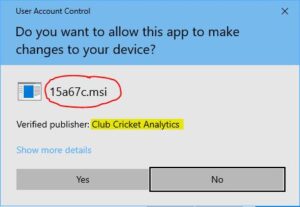
Now, when you install CCA.MSI Windows will show a blue “User Account Control” box asking:
• Do you want to allow this app to make changes to your device?
• The Program name might appear as a random file name (for example 15a67c.msi); this is normal (see image below).
• The important part to check is the line Verified publisher: Club Cricket Analytics (highlighted in the image below).
• If you see Verified publisher: Club Cricket Analytics, you can click Yes to continue installing Club Cricket Analytics.